Software marketed to large operators is overkill for a fourplex, and a spreadsheet is underkill the moment you have more than two tenants. Managing a triplex with paper receipts and reminder notes works for about six months; then a rent check bounces, a maintenance request arrives by text, and you cannot find last year's insurance declarations page. The sweet spot for 1-10 unit landlords is a platform that handles rent collection, ledgers, maintenance, documents, and year-end tax forms without enterprise pricing. This guide covers what you actually need, how the platforms differ, and how to set one up so it pays for itself at tax time.
What a small landlord actually needs
- Online rent collection with free ACH for tenants and card payment as a tenant-paid option, plus late-fee automation and the ability to block partial payments when you need to.
- Per-property and per-unit ledgers that categorize income and expenses in the same buckets as Schedule E: advertising, cleaning and maintenance, insurance, management, mortgage interest, repairs, supplies, taxes, utilities, depreciation.
- Maintenance request intake with photos, a status trail, and vendor assignment.
- Document storage for leases, addenda, inspection reports, and insurance, tied to the unit.
- Tenant screening (credit, eviction, criminal where legal) paid by the applicant, with compliant adverse-action handling.
- Tax-time exports: a Schedule E-style report per property, 1099 preparation for contractors, and a clean CSV.
Nice to have: listing syndication, e-signatures, utility billing support, and owner statements if you manage for someone else.
How the platforms differ
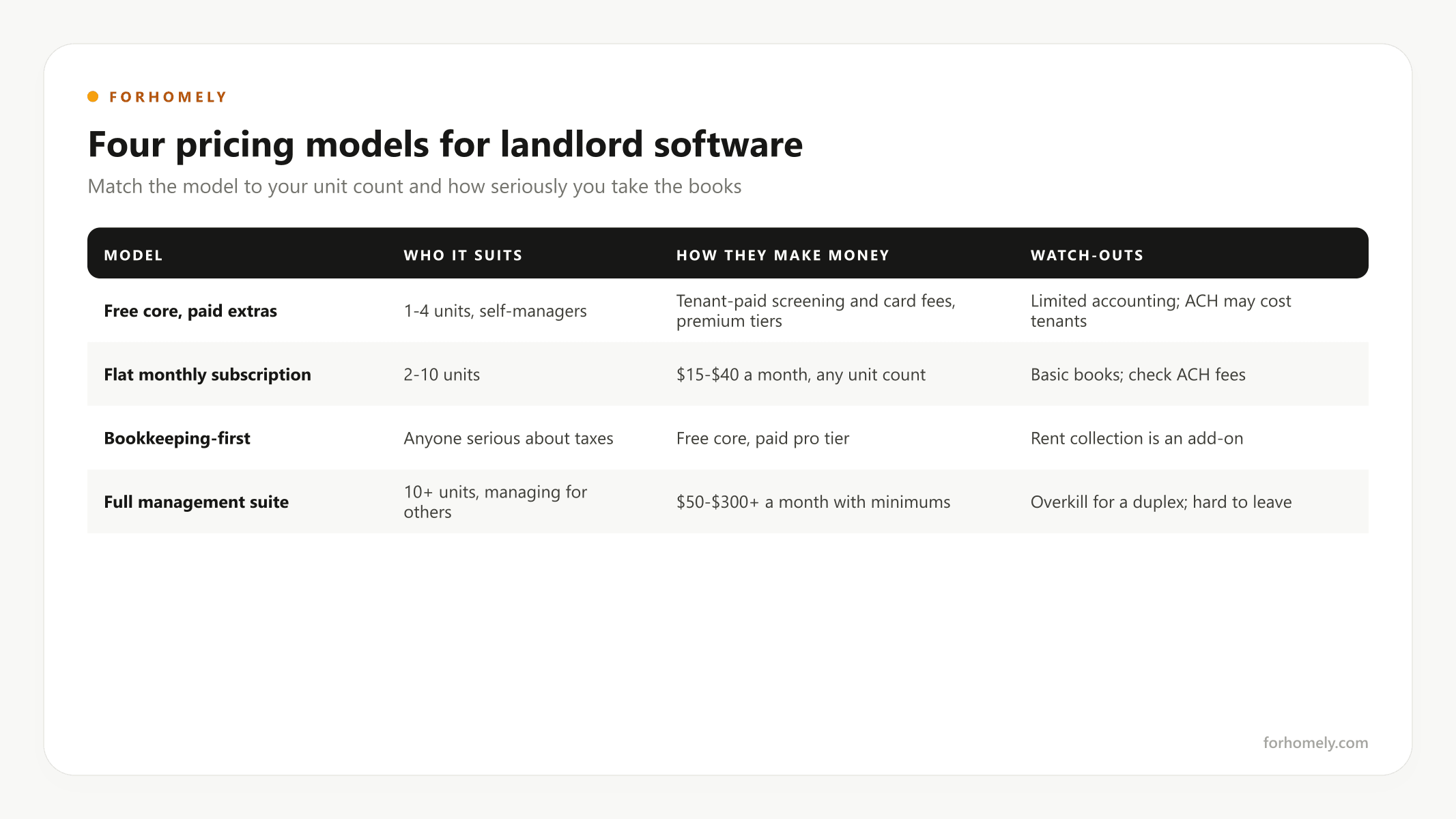
Rather than a snapshot of prices that will be wrong in six months, it is more useful to understand the three models the market has settled into. Verify current pricing on each vendor's site before you commit.
| Model | Who it suits | How they make money | Typical strengths | Watch-outs |
|---|---|---|---|---|
| Free core, paid extras (landlord-focused apps backed by listing sites or banks) | 1-4 units, self-managers | Tenant-paid screening and card fees, optional premium tiers, banking float | Free rent collection, leases, listings, screening flow | Accounting depth is limited; some charge tenants for ACH on the free tier |
| Flat monthly subscription (mobile-first landlord apps) | 2-10 units | $15-$40 a month regardless of unit count | Tenant app, maintenance intake, simple books | Accounting is basic; check ACH fees |
| Bookkeeping-first (finance apps built for rental owners) | Anyone serious about taxes | Free core with a paid pro tier | Bank-feed categorization mapped to Schedule E, fixed-asset tracking | Rent collection is an add-on, not the core |
| Full property management suites | 10+ units, or managing for others | $50-$300+ a month with per-unit minimums | Full accounting, owner reporting, trust accounting, scale | Priced and complex for a duplex; migration later is painful |
Two pairings work for most small landlords: a free-core app for rent, leases, and screening plus a bookkeeping-first app for the books; or a flat-subscription app that does both adequately. Move to a full suite when you cross ten units, manage for others, or need trust accounting.
The ACH fee math
Most platforms charge tenants $0-$2 for ACH and 2.75-3.5% for cards. The right policy is simple: make ACH the default and free, allow cards, and charge the card fee to the tenant who chooses one. Never absorb card fees on rent: $1,800 of rent paid by card at 3% is $54 a month, $648 a year, per unit. On a fourplex that is $2,600 a year, or roughly $43,000 of value at a 6% cap rate, given away for convenience.
Also check who pays for ACH returns (a bounced rent payment typically costs $10-$30), whether the platform lets you block partial payments during an eviction, and how many days funds take to settle.
Matching the tool to your situation
Self-managing 1-3 units, want to spend nothing. A free-core app for rent collection (tenant-paid fees optional), applicant-paid screening, and enough structure to stay organized. Pair it with a bookkeeping app or a disciplined spreadsheet.
4-10 units, want real books. A bookkeeping-first app plus a rent-collection app, or a flat-subscription app that does both. At this size, clean per-property expense tracking saves real money at tax time; every documented dollar is a Schedule E deduction.
Planning to scale past 10 units, or managing for others. Start on a full suite early. Migrating ledgers mid-growth is painful; the monthly fee is cheaper than the migration.
The disciplined minimalist. Two or three units, a shared drive for documents, a form that logs maintenance requests to a spreadsheet, a dedicated bank account, and a spreadsheet ledger with monthly categorization. Cost: $0. It works exactly as long as you keep it current, and it stops working the first month you do not.
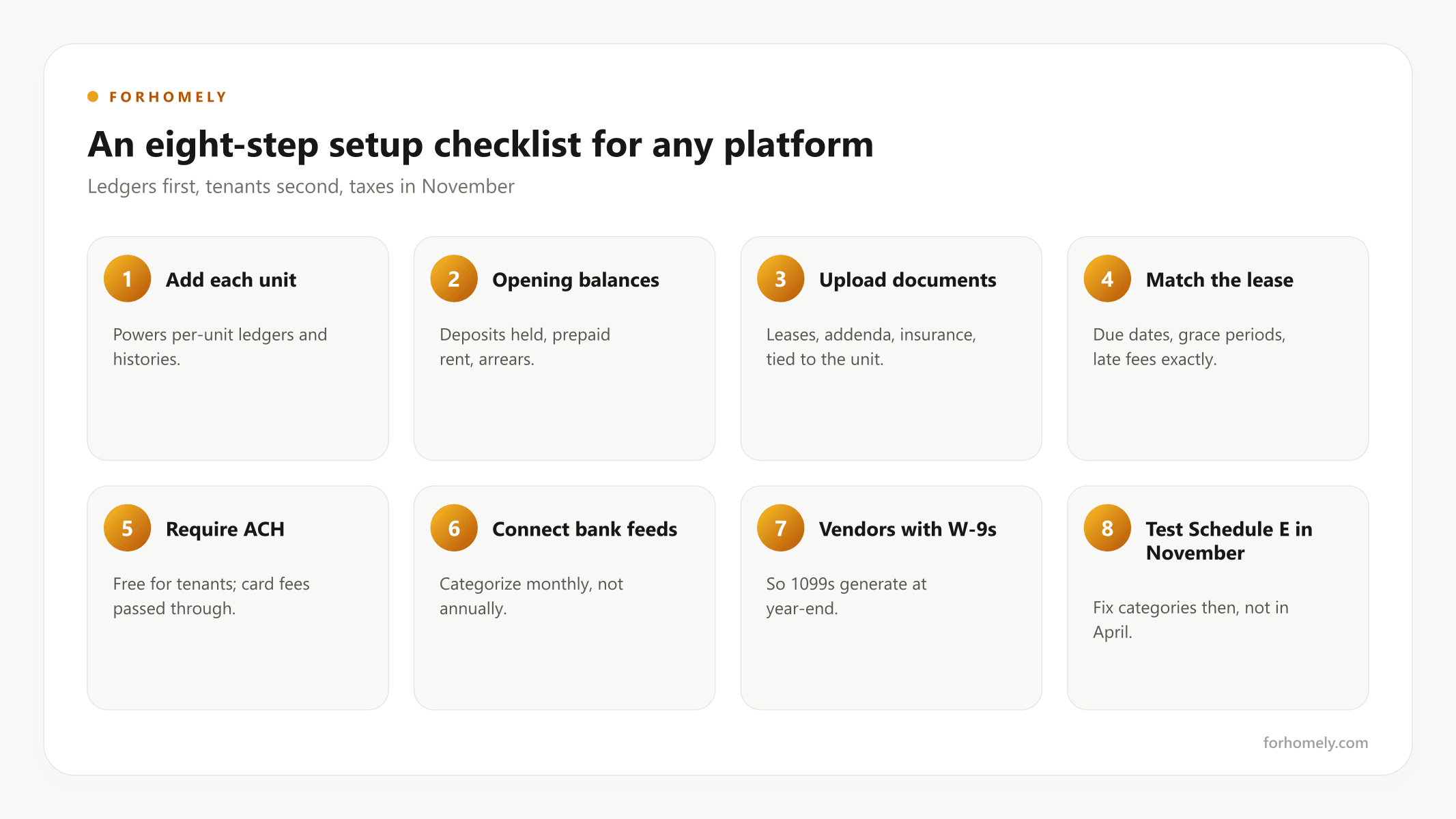
Setup checklist for any platform
- Add each property and each unit separately; this powers per-unit ledgers and per-unit rent histories.
- Enter opening balances: deposits held (and where), prepaid rent, and outstanding balances.
- Upload leases, addenda, and insurance documents to the unit.
- Set rent due dates, grace periods, and late-fee rules to match the lease exactly; the software must not charge a fee the lease does not authorize.
- Invite tenants and require ACH; explain the card fee policy in writing.
- Connect bank feeds for the property's dedicated account and categorize monthly, not annually.
- Add contractors as vendors with W-9s on file so 1099s generate automatically at year-end.
- Export a test Schedule E report in November. Fix categories then, not in April.
Screening and fair-housing hygiene inside the software
Whatever platform you use, write your screening criteria down before the first application: minimum income multiple, credit thresholds, eviction lookback, and how you treat criminal history under the rules that apply to it. Apply them identically to every applicant, keep the adverse-action notices the platform generates, and keep applications and decisions for at least three years. The software makes consistency easy; the law requires it.
The bottom line
For most 2-4 unit landlords, a free rent-collection app plus a bookkeeping app covers 95% of needs at near-zero cost. Pay for software only when a specific problem, scale, accounting depth, or maintenance volume, demands it. Once your books are clean, your own T-12 feeds directly into the Multifamily Cash Flow Calculator for refinancing packages and your next purchase, and it is the same document you will hand a buyer when you sell.